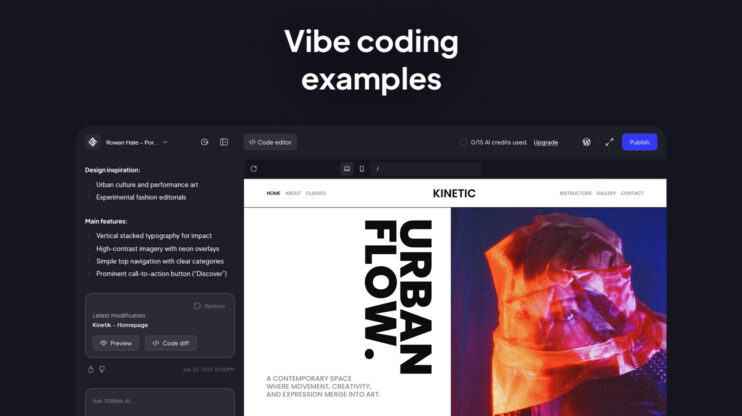

Collins Dictionary named vibe coding its Word of the Year for 2025. By early 2026, 46% of all new code committed globally is AI-generated. If you’ve ever thought, “I have an idea, but I’m not technical enough to build it,” this is your moment. This guide explains what vibe coding is, how it works, where it falls short, and how to start, including with WordPress.
What is vibe coding?
Vibe coding is the practice of building websites or software by describing what you want in plain language, and letting AI write all the code. You explain your goal; the AI translates it into working HTML, CSS, JavaScript, or whatever the platform requires.
The term was coined by Andrej Karpathy in February 2025. His framing: “fully give into the vibes, forget that the code even exists.” The concept flipped traditional development, instead of learning syntax to express intent, you express intent directly and skip the syntax entirely.
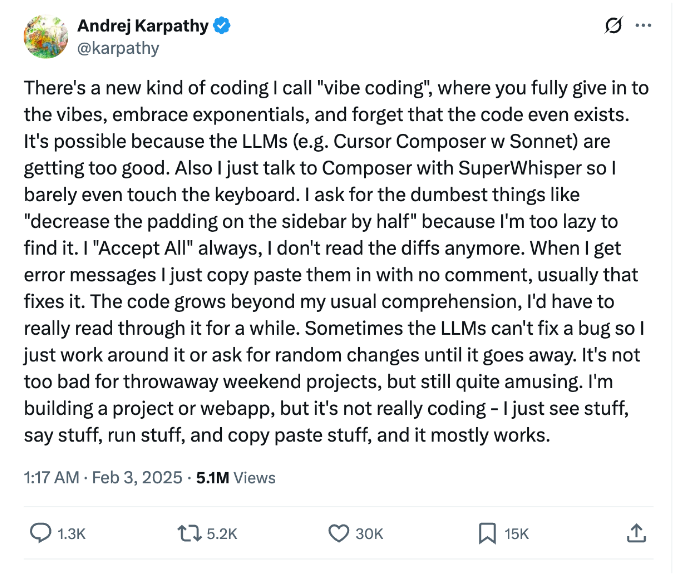
The tweet that defined vibe coding.
Vibe coding is not the same as AI autocomplete inside a code editor. It spans a spectrum, from complete no-code creation to AI-assisted development inside professional toolchains.
Traditional coding vs. vibe coding
| Aspect | Traditional coding | Vibe coding |
| How you build | Write code manually | Describe what you want |
| Who it’s for | Developers | Anyone with an idea |
| Time to prototype | Weeks | Hours |
| Focus | Syntax and structure | Outcome and intent |
| Security responsibility | Developer | Shared with platform |
| Maintenance overhead | Developer | Partially AI-assisted |
Vibe coding represents a shift in creative power, from technical experts to creative thinkers. You no longer need to “learn to code” to bring your ideas to life. Non-technical creatives are all in on vibe coding and AI tools.
Who vibe coding is actually for
Two genuinely different audiences use vibe coding, with different expectations and risk profiles.
Non-technical creators: entrepreneurs, designers, freelancers, and first-time builders. For this group, vibe coding delivers a working site from a description. No setup, no syntax, no dependency management.
Developers and technical builders: engineers using AI to accelerate inside real codebases. Tools like Cursor and GitHub Copilot fit here. For this group, vibe coding reduces time-to-output. It does not replace code knowledge.
The tool landscape has split cleanly along this line. Choosing the right tool depends entirely on which group you’re in.
How vibe coding works
The quality of what you get out tracks directly with the quality of what you put in. A strong first prompt shapes everything that follows, structure, tone, functionality. Getting that right from the start saves significantly more time than fixing a weak result after the fact.
Step 1: Describe your idea
Start with a prompt that covers purpose, audience, tone, and key features. A specific prompt produces a usable result. A vague prompt produces a generic one.
Strong prompt:
“Create a minimalist online shop for handmade candles. Include product pages, a cart, and a checkout flow. Use soft, warm colors and clean typography.”
Weak prompt:
“Build a candle shop.”
Step 2: AI generates the structure
The AI interprets your intent and builds the layout, design, and functionality automatically. You never see the code unless you want to.
Step 3: Refine through conversation
Work iteratively, one change at a time produces better results than sweeping rewrites. Prompts like “move the gallery above the contact section” or “change the heading font to something more editorial” give the AI clear direction.
Step 4: Review before you publish
Preview on mobile and desktop. Test every interactive element, forms, buttons, booking flows. This step is more consequential than most guides suggest. The security section below explains why.
The vibe coding tool landscape
46% of all new code committed globally is now AI-generated, and the tools driving that shift fall into two camps.
AI code editors are built for developers working inside existing codebases. Cursor, GitHub Copilot, and Claude Code fall here. They accelerate coding, they do not replace coding knowledge. GitHub Copilot now has over 20 million users, growing 75% year-over-year.
AI website and app builders let anyone generate a working product from a text prompt. Replit, Lovable, and Bolt fall here.
For WordPress websites, 10Web’s Vibe for WordPress sits in this second category with one meaningful difference: it generates fully functional WordPress sites, not standalone apps. The workflow is conversational, describe your site, watch it appear, then refine in chat, in the visual editor, or using code.
What vibe coding does well and where it struggles
Vibe coding handles well-scoped, greenfield projects with clear intent. Fast iteration, quick experimentation, and a low barrier to a working prototype are genuine strengths.
The limitations are equally real and documented.
- The fix-one-break-ten loop. AI fixes one issue and introduces others, especially in codebases beyond a few hundred lines. 66% of developers report experiencing this productivity tax.
- The last 20% problem. AI handles the first 80% of any project quickly. The remaining 20%, production hardening, edge cases, security review, requires exactly the skills vibe coding promised to eliminate.
- Technical debt. AI-generated components become isolated logic islands. Build 20 features across 20 prompts without a coherent architecture and you create 20 independent maintenance problems.
- Security: what you actually need to know
Security is the most under-covered topic in vibe coding guides, and the most important one before you deploy anything real.
AI-generated code carries a 2.74× higher security vulnerability rate compared to human-written code. A review of 1,645 Lovable-built applications found 170 with vulnerabilities that allowed personal data to be accessed by anyone. A survey of 18 CTOs found 16 reported production failures directly caused by AI-generated code, ranging from data corruption to bypassed subscription logic.
Common vulnerability categories include broken access controls, missing input validation, improper session expiration, and exposed credentials. These often look correct in source code but break under real-world conditions.
Before you publish, check:
- Forms don’t expose submitted data
- Authentication flows actually gate the content they’re supposed to
- No credentials are hardcoded in generated scripts
- Interactive elements work under edge-case inputs
For WordPress-based vibe coding, the underlying platform handles much of this by default. WordPress’s security model has been tested against real threats at scale for years, that’s a genuine structural advantage.
How to start vibe coding
The fastest way to understand vibe coding is to try it with a specific, real idea.
- Choose your tool. For developers: Cursor or GitHub Copilot. For non-technical creators building a website: 10Web Vibe for WordPress, Replit, or Lovable.
- Write a strong first prompt. Cover purpose, audience, tone, and 3–4 key features.
- Start small. A one-page site or a single feature is the right scope for a first session.
- Review before you ship. The checklist in the security section above applies here.
For WordPress sites, start at 10Web.io.
FAQ
Can vibe coding handle databases, user logins, or payment processing?
It depends on the platform. AI website builders can generate forms and connect to common payment processors like Stripe, but complex logic, user authentication systems, relational databases, or multi-step checkout flows, often requires review and testing before it’s production-safe. For standard business website needs (contact forms, bookings, simple e-commerce), most platforms handle it well. For anything involving sensitive user data, treat the AI-generated output as a starting point, not a finished product.
What if the AI makes a mistake I can't identify because I don't know code?
This is the central risk of vibe coding for non-technical users. The practical safeguard is behavioral, not technical: test every user-facing flow under real conditions, not just in the editor preview. Forms, buttons, checkout steps, and authentication gates should all be tested as if you’re a real visitor. Platforms built on established backends (like WordPress) carry an additional layer of protection, known vulnerabilities get patched system-wide, independent of what the AI generated.
Is there a way to see or edit the actual code on a vibe-coded site?
Yes, on most platforms. Tools like 10Web Vibe for WordPress let you switch between the conversational editor and a code editor view. You don’t need to use the code editor — but it’s available if you want to inspect what was generated or bring in a developer later. This is worth checking before you commit to a platform: you should own access to the underlying code.
What's the difference between vibe coding a website and vibe coding an app?
A website serves content — pages, portfolios, shops, blogs. An app has logic — user accounts, data that changes per user, workflows. Vibe coding tools for websites (like 10Web Vibe for WordPress) are optimized for the former. App builders like Replit and Lovable handle the latter but introduce more surface area for the security and maintenance issues covered in this article. The simpler the logic, the more reliably vibe coding delivers a production-ready result.
What happens to my site if the platform shuts down or I want to leave?
This is one of the most important questions to ask before choosing a platform. If your site is generated as a proprietary format tied to a specific tool, migrating is difficult or impossible. Sites built on WordPress are different — the underlying content, database, and theme all live in a standard format that can be moved to any WordPress host. This portability is a meaningful long-term advantage over platforms that lock you into a proprietary architecture.
Can I hand a vibe-coded site to a developer for further work?
Yes, provided the platform gives code access. A developer can take over a vibe-coded WordPress site exactly as they would any other WordPress project. For app-builder platforms, it depends on whether the code is exportable and how clean the AI-generated output is. Messy or heavily generated code can be harder to work with than code a developer wrote themselves. It’s worth setting that expectation if handoff is part of your plan.
Will a vibe-coded site rank on Google?
It can. SEO performance depends on site structure, content quality, page speed, and technical fundamentals like metadata and clean HTML. AI-generated sites vary widely here. Platforms built on WordPress inherit a strong SEO foundation out of the box (clean markup, plugin ecosystem for meta management, sitemap generation). Standalone app-builder output is less consistent and may require manual SEO work that the platform doesn’t handle for you.