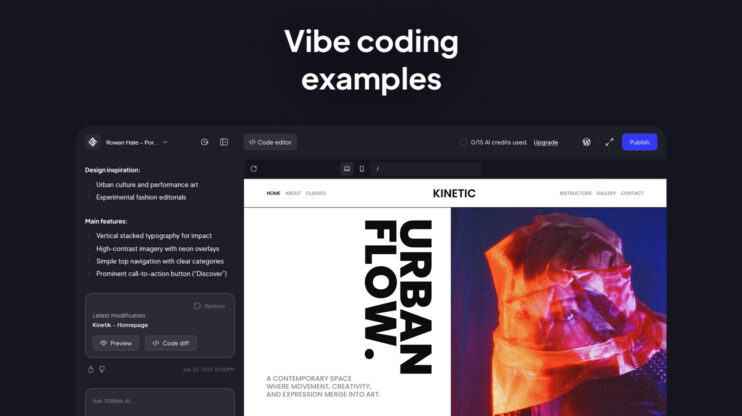
Vibe coding has existed for about five minutes, and somehow everyone has already built a startup with it. Or tried to. The reality is a bit messier. Most first attempts produce something that looks almost right, breaks in ways you can’t explain, and leaves you wondering what to do next.
This article is for you, the one who got this far and wants to go further. It covers the practical difference between vibe coding and traditional coding, and gives you a step-by-step process that takes you past the first prompt.
Vibe coding vs. traditional coding
The most important difference between vibe coding and traditional coding is that one requires you to know a programming language before you can build anything, the other doesn’t.
Coding knowledge
Vibe coding requires no coding knowledge. You describe what you want in plain language, and the AI handles all syntax, structure, and logic. The barrier to entry is having a clear idea of what you want to build.
Traditional coding requires learning a programming language before you can build anything independently. HTML, CSS, and JavaScript for web development alone can take months to reach a functional level. Frameworks, version control, and deployment add further complexity on top.
For non-developers, this difference is decisive. Vibe coding lets you start today. Traditional coding requires a significant time investment before you produce a single working page.
Vibe coding vs. traditional coding at a glance
| Aspect | Vibe coding | Traditional coding |
| Coding knowledge required | None. Plain language prompts | Yes. Syntax, logic, programming language |
| Time to first result | Hours | Weeks to months |
| Who can use it | Anyone with an idea | Developers and technical builders |
| Control over output | Review and iterate | Full ownership of every line |
| Debugging | Re-prompt or ask AI | Debug the code you wrote |
| Scalability | Best for bounded, focused projects | Scales with teams and process |
| Long-term maintenance | Platform-dependent | Full developer control |
| Security responsibility | Shared with platform | Developer-owned |
| Best for | Websites, landing pages, prototypes | Complex platforms, custom logic |
Mindset: Understanding vs. shipping
Traditional coding forces you to hold the entire problem in your head until you’ve resolved it into working logic. Every line you write is a decision you understand. Vibe coding shifts that process. You describe intent, the AI fills in the logic, and you review what comes out.
The widespread adoption of that shift is now measurable. Stack Overflow’s 2025 Developer Survey found that 84% of professional developers are actively using or planning to use AI coding tools. In the same survey, developer trust in AI accuracy had dropped from 40% to 29% year-over-year. Speed went up. Confidence in what was being shipped went down. That tension is the defining characteristic of vibe coding in 2026.
Speed, control, and long-term ownership
Vibe coding is faster to start. A working website takes hours instead of weeks. In traditional coding, you wrote every line, so you know exactly where to look when something breaks.
The speed gains are real and well-documented. A McKinsey study from February 2026 found a 46% reduction in routine coding time, with time savings reaching 81% specifically for API integration (connecting your site to external services like payment processors or email tools) and boilerplate generation (the repetitive, standardized code that has to be written the same way every time). Senior developers report productivity gains of up to 81% on tasks where the scope is clear and bounded. The trade-off is that someone still has to own the output. Speed without review is how small problems become expensive ones.
Testing and debugging
In traditional coding, tests are written and understood by the person who built the feature. When something fails, the signal points directly to the logic you introduced. Debugging is slow, but it’s yours.
In vibe coding, bugs hide differently. The surface looks clean, the AI confirms everything is working, and the problem only surfaces in production. A common failure mode is the AI writing tests that always pass because they’re testing the wrong condition entirely. The scale of this problem is visible in the numbers: 63% of developers report spending more time debugging AI-generated code than it would have taken to write it themselves. Development has gone AI-native. Testing mostly hasn’t caught up. Teams are shipping three to five times faster while their test coverage is still written and maintained by hand.
Scalability
Vibe coding thrives in the early stages of a project, when speed and exploration matter more than final architecture. For a landing page, a portfolio site, or a marketing microsite, it produces a working result faster than any other method.
The limitations appear as projects grow. Research shows that vibe-coded projects accumulate technical debt three times faster than traditionally developed software. Past a few hundred lines of code, fixing one issue starts to introduce others. The AI edits unrelated files, guesses at how pieces connect, or restructures something that was working to fix something that wasn’t.
The exception is building on a proven foundation rather than generating one from scratch. WordPress powers 43% of all websites and has a global ecosystem of developers who can extend, maintain, or take over any site built on it. Tools like 10Web’s Agentic Website builder generate sites directly on WordPress, which means the output isn’t a proprietary one-off codebase. If the project grows beyond its original scope, a developer can read it, extend it with any of 60,000+ available plugins, or hand it off without needing to translate it into something standard first.
Security
Security is the most under-discussed dimension of vibe coding, and the data from 2025 and 2026 makes the risk concrete. Veracode’s 2025 GenAI Code Security Report, which tested over 100 LLMs across 80 coding tasks, found that 45% of AI-generated code introduced vulnerabilities from the OWASP Top 10 — a widely referenced list of the ten most critical and commonly exploited security weaknesses in web applications.
GitGuardian’s State of Secrets Sprawl 2026 report documented 28.65 million new hardcoded secrets, sensitive credentials like passwords or API keys written directly into the code, in public GitHub commits during 2025, a 34% year-over-year increase, with AI-assisted commits exposing secrets at more than twice the rate of human-only commits.
AI-generated code can look correct at a surface level while containing vulnerabilities that only surface under real conditions. Broken access controls, missing input validation, and improperly handled sessions are among the most common categories. For anything handling user authentication, payments, or sensitive data, security needs to be reviewed deliberately. The output running without errors is not the same as the output being safe.
Traditional coding approaches security as a first-class concern: threat modeling, dependency vetting, compliance checklists, code review, and checks with a SAST tool before release. You don’t ship features until you’ve earned confidence they’re safe. It’s slower, yes; but you end up with software you can trust in production.
The platform a site is built on changes the vibe coding security concern. With tools like 10Web Agentic Website builder, security is managed by the platform provider, not left to the site owner or the AI to configure. 10Web handles Cloudflare Enterprise firewall protection (a commercial-grade filter that blocks malicious traffic before it reaches the site), automated malware scanning and removal, DDoS defence (protection against coordinated attacks designed to knock a site offline), 24/7 uptime monitoring, and automated WordPress core and plugin updates that close known vulnerabilities as they appear. Authentication, session handling, and login protection are all handled at the infrastructure level. For a non-developer building a site through a vibe coding workflow, the security layer is in place before the site ever goes live without requiring any manual configuration.
Which approach fits your project
Use vibe coding when:
- You’re a non-developer building a marketing site, portfolio, or landing page
- Speed matters more than owning every line of code
- The project is well-defined, you can describe the finished site in five sentences
- You want to test an idea before committing to full development
Use traditional coding when:
- The project requires custom backend logic, database design, or complex integrations
- A development team will maintain and extend the codebase long-term
- Security, compliance, or performance requirements demand full code ownership
- The product will scale significantly beyond its original scope
The hybrid approach works well for most teams. Use vibe coding to prototype and validate, then hand off to a developer if the project grows beyond what the platform handles cleanly.
Vibe coding tutorial
Building a website with vibe coding follows a five-step process. The steps below apply to any AI website builder. One distinction worth noting before you choose a tool: some platforms generate standalone code that only runs within their environment, while others like 10Web, generate sites on top of WordPress, meaning the output is a standard CMS you own and can work with independently of the platform.
Step 1: Plan before you prompt
Write 3–5 sentences about your website before opening any tool. Cover: what the site is for, who it’s for, the tone, and which pages it needs.
This planning note becomes the foundation of your first prompt. The more specific your prompt, the more usable the AI’s first output will be. Skipping this step is the most common reason first attempts produce generic, unfocused results.
Decide before you start:
- The primary goal of the site (sell, inform, book, showcase)
- The main action you want visitors to take
- 3-4 sections or pages the site must include
- The tone: formal, casual, technical, conversational
Step 2: Write your first prompt
A strong first prompt covers four things: what the site is for, who it serves, the tone, and 3–4 key pages or features.
Strong prompt: “Build a website for a freelance photographer. Include a homepage with a hero image, a portfolio gallery, an about page, and a contact form. The tone should be minimal and editorial, with a dark background and light typography.”
Weak prompt: “Make a photography website.”
The strong prompt produces a usable structure on the first pass. The weak prompt produces something generic that requires multiple correction rounds to repair. Two minutes on the prompt saves an hour of iteration.
Step 3: Review the AI output
Check structure before design. The first question is whether the layout logic is correct, not whether the colors look good.
Check on the first pass:
- Are the right sections and pages present?
- Does the navigation reflect the site structure you planned?
- Is the page hierarchy logical, does the homepage link to the portfolio, does the portfolio link back?
Ignore on the first pass:
- Placeholder copy, it will be replaced
- Font and color choices, those come after structure is confirmed
- Visual details that are not functional
Flag structure problems immediately. Fixing a missing page before iteration is fast. Fixing it after ten rounds of refinement is slow.
Step 4: Iterate with follow-up prompts
Make one change at a time. Prompts that try to fix multiple things at once produce inconsistent results and introduce new problems.
Good correction prompt: “Move the testimonials section above the contact form. Keep everything else as it is.”
Weak correction prompt: “Change the layout, update the copy, make it more modern, and add a pricing table.”
When the AI breaks something that was working, describe exactly what changed and ask it to revert that specific element. The more precisely you describe the problem, the more reliably it gets resolved.
Step 5: Test before you publish
Testing takes 15 minutes and prevents most post-launch problems.
- Responsive: Check every page on a phone. Layout issues are common in first-generation output and invisible on desktop.
- Links: Click every navigation item and button. Broken links appear frequently in AI-generated site structures.
- Forms: Submit a test entry through every form and verify it sends correctly.
- Speed: Check for oversized images. AI builders sometimes include uncompressed images that significantly slow load time.
- Basic SEO: Confirm every page has a title tag, meta description, and image alt text.
Common vibe coding mistakes
These are the patterns most beginners repeat. Each one is fixable once you recognise it.
- Over-prompting. Trying to build the entire site in one message. The AI produces something sprawling and generic.
Fix: build one section at a time. - Skipping the review. Accepting the first output and iterating on a broken structure.
Fix: always check the layout before you touch copy or design. - Styling before structure. Changing fonts and colors while the page hierarchy is still wrong. Fix: lock the structure first, then refine the visual design.
- Blind acceptance of bug fixes. Asking the AI to fix something without checking what else changed.
Fix: review the full output after every correction prompt, not just the element you targeted. - No mobile check. First-generation outputs frequently have mobile layout problems that are invisible on desktop.
Fix: preview on mobile before starting your next iteration.
When vibe coding is the right choice
How far vibe coding takes you depends as much on the platform you choose as it does on the project itself. Some vibe coding platforms are proprietary, the site only runs inside their environment, the code isn’t portable, and scaling beyond their plan limits means starting over. Others build on open, established infrastructure that you own and can grow. That choice sets the ceiling before you write a single prompt.
If the platform is proprietary and closed, vibe coding works well for:
- Landing pages and campaign microsites
- Portfolio and personal brand sites
- Event pages and short-term campaigns
But it starts to struggle as soon as:
- The project needs to grow beyond the platform’s plan limits
- You want a developer to extend or maintain the site
- You need to migrate to a different host or tool
If the platform builds on open infrastructure, like 10Web, which generates sites on WordPress, the same starting point can scale into a full business website, an e-commerce store, or a multi-site operation without rebuilding from scratch. The code is yours, the site runs on a standard CMS (content management system), and any developer can pick it up if the project grows.
Conclusion
Traditional coding requires you to learn before you build. Vibe coding lets you build from day one, without any coding knowledge. For websites with a clear scope, that difference makes vibe coding the faster, more accessible path for non-developers.
The five-step process is repeatable regardless of tool: plan before you prompt, write a specific first prompt, review structure before design, iterate one change at a time, and test before you publish. Following it consistently produces better results than any shortcuts.
FAQ
Do you need to know how to code to vibe code?
No. Vibe coding requires zero coding knowledge. You describe what you want in plain language, the AI generates the structure, logic, and layout. The only requirement is a clear idea of what you want to build. You’ll need to review what the AI produces, but that means checking whether the result matches your intent, not reading code line by line.
What is the real difference between vibe coding and traditional coding?
The starting point. Traditional coding requires learning a programming language before you can build anything, HTML, CSS, JavaScript, and often frameworks on top of those. Vibe coding requires none of that. You communicate in plain language, the AI writes the code, and you review the output. The trade-off is control: traditional coding gives you full ownership of every line; vibe coding gives you speed at the cost of deep visibility into what was built.
How long does it actually take to build a website with vibe coding?
A functional first version typically takes a few hours, not days. Planning and writing your first prompt takes 15–30 minutes if done properly. Iteration and refinement add time depending on how specific your requirements are, and testing before publishing takes another 15 minutes. The total is far shorter than traditional development, the variable is how clearly you defined the project before opening the tool.
Why do my vibe coding prompts keep producing generic results?
Almost always because the first prompt was too vague. A prompt like “make a photography website” gives the AI no specific direction, it fills the gaps with defaults, which look generic because they are. A strong prompt specifies the site’s purpose, audience, tone, and 3–4 required pages or features. The more context you give upfront, the less the AI has to guess, and the closer the first output is to what you actually want.
What do you do when the AI breaks something that was working?
Describe exactly what changed, not just what’s wrong. Instead of “fix the layout,” write: “the testimonials section moved below the footer, please move it back above the contact form and leave everything else as it is.” The more precisely you describe the problem, the more reliably the AI reverses it. Asking it to fix something vague gives it permission to restructure things you never intended to change.
Can a vibe coded website rank on Google?
Yes. Search engines rank pages on content quality, technical performance, and relevance, not on how the code was written. A vibe coded site can rank well if it loads fast, has proper title tags and meta descriptions, and publishes content that matches what people search for. The common failure is publishing without checking basic SEO elements, page titles, meta descriptions, and image alt text, which AI builders sometimes leave incomplete.
What happens if I outgrow the platform I used to vibe code my site?
It depends on whether the platform is proprietary or open. On a proprietary platform, the site runs only within that environment, migrating means rebuilding from scratch. On an open platform like 10Web, which generates standard WordPress sites, the output is portable. A developer can take over, the site can be migrated to any WordPress-compatible host, and the codebase works with any of 60,000+ existing plugins without needing to be rebuilt or translated.