

A true builder decision isn’t based on what your homepage looks like on day one. It’s what happens on day thirty when you need to add a new service, fix a broken layout on mobile, update pricing across three pages, or launch a landing page by tomorrow. That’s when you find out whether your builder is a calm, reliable system… or a beautiful trap.
Squarespace is the classic all-in-one builder: design, editing, hosting, and ecommerce live in one place. It’s built to keep you moving, keep things consistent, and keep the number of decisions low.
10Web AI Website Builder takes a different route: it is a focused website builder that uses AI to generate a WordPress website quickly, then you refine it with AI and visual tools on top of WordPress. 10Web has more flexibility, more ways to scale, and yes, sometimes more choices.
Let’s compare these two builders and include the editor of each builder as a part of the experience.
You’re really buying a journey
A builder is a journey product with phases.
-
- Start: go from nothing to something
- Shape: create structure: pages, navigation, sections
- Polish: make it feel like your brand
- Loop: keep updating without friction
- Grow: expand: new features, integrations, bigger content
Squarespace and 10Web both cover those phases in their own way.
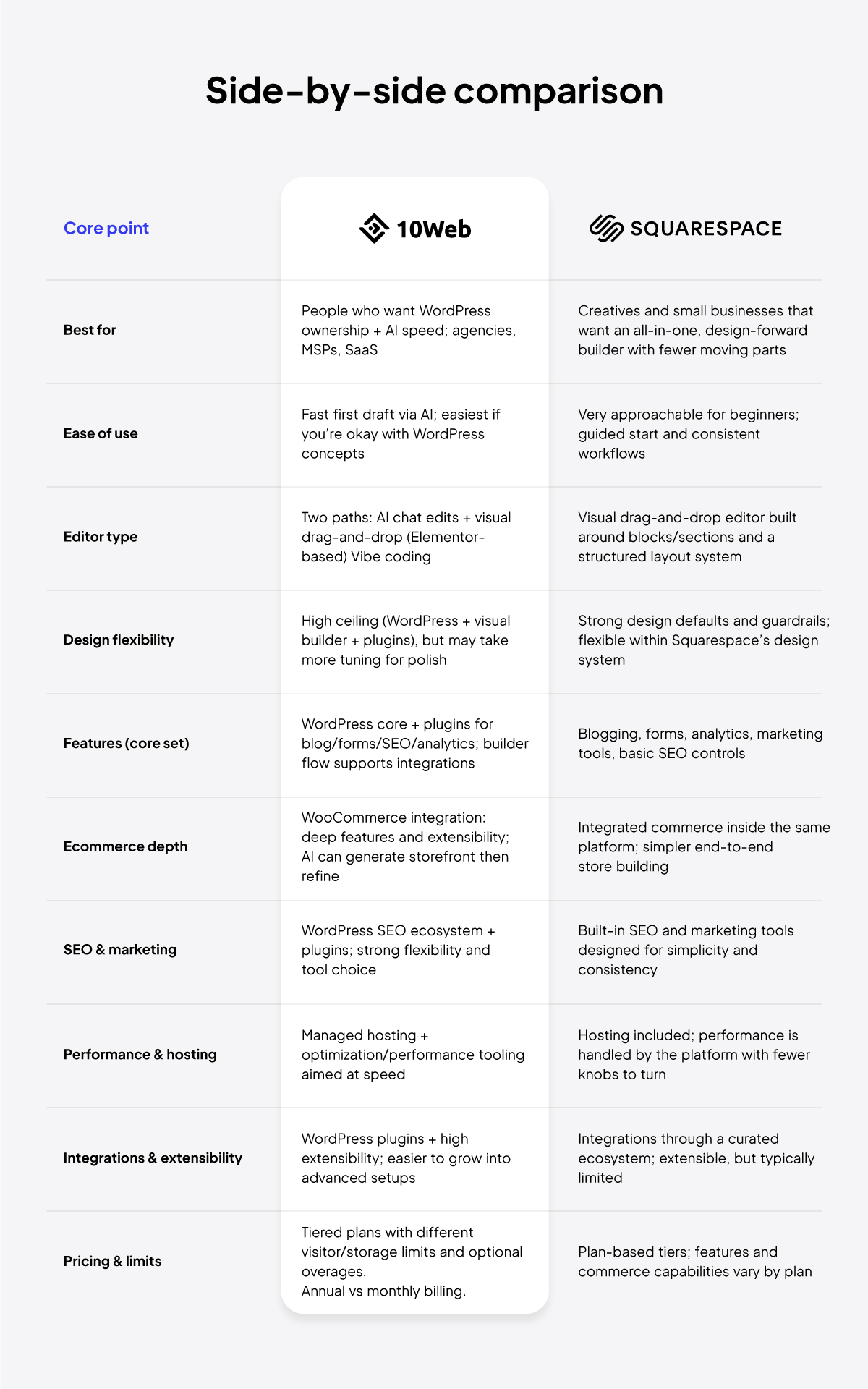
Squarespace uses pre-designed templates, giving you strong design defaults and clear rules, so it’s harder to make a site that looks messy. The upside is more consistent results, especially for beginners. The downside is that it can feel limiting if you’re trying to achieve something that is more customized.
10Web gets you a big first draft fast (AI-generated WordPress site), and then you choose how far to take it, simple tweaks, deeper redesign, extra features, plugins, integrations, the whole thing. You get flexibility and control over your website. The downside is you may need to do more refining to keep everything polished and consistent.
How fast you get something to publish
On day zero, most people want two things that don’t always go together: speed and quality.
Squarespace delivers quality via pre-built professional templates. You’re guided into a coherent look, and the system’s defaults keep you from making a lot of design mistakes, because you don’t really have much to choose from. If you get overwhelmed by choices, this is a real advantage.
On the other hand, with 10Web you describe your business and get a multi-page, production-ready WordPress site, including layouts, copy, images, and responsive styles, which you then refine using either AI chat or visual editing.
The part that’s most important is what happens between your description and the finished site. In 10Web’s flow, the AI doesn’t just spit out a page. It plans the build: it proposes a full structure (pages, sections, navigation), lets you review and rearrange the sitemap, and only then generates the site.
That structure-first step is not a small detail. It’s one of the reasons 10Web is a stronger choice when you’re building more than a simple brochure site.
Structure, pages, sections, and the moment your site gets real
The moment your site becomes real is when you build the second page. By the time you’re on the third page, you notice the spacing doesn’t match. On the seventh page is when you realize your builder either helps you stay consistent… or encourages you to create chaos.
Squarespace uses patterns, building blocks, and a section-based approach that allows you to reuse layouts and keep pages consistent. That consistency is a huge reason people stay on Squarespace for years. They don’t want the freedom to invent ten different styles of “call to action” sections; they want one that looks good everywhere.
However, if scaling is going to be a part of your structure and purpose, then 10Web’s builder is better. Because it’s WordPress-based, your site structure can grow in a familiar way: pages, posts, menus, categories, and a huge range of add-ons if you need them. For teams or agencies, that matters because the builder isn’t just for making homepages. 10Web’s builder is designed to replicate a process across many sites.
The key difference shows up when you scale beyond a few pages:
- Squarespace prioritizes consistency through a structured system.
- 10Web prioritizes speed-to-build and flexibility by generating WordPress first, then refining.
With 10Web, you’re not just copying and pasting layouts, you can regenerate or replace sections and create style/tone variants as part of iteration. That can make it easier to keep the site cohesive, especially when you’re moving fast.
Design consistency
Design consistency is what makes a website. It’s also what breaks first when you’re rushing.
Squarespace leans heavily on design defaults, templates. That means you can be a non-designer and still end up with something that looks intentional. It’s hard to accidentally make a Squarespace site feel completely unhinged. The builder is designed to keep your typography, spacing, and layout language cohesive.
10Web gives you a different advantage, greater flexibility. If you want deeper control, or you want the site to evolve beyond what the original template system allows, WordPress plus a visual builder ecosystem can stretch further. You can shape the site more, and you can integrate more over time.
The tradeoff is that extra control can also create inconsistency if you’re not careful. When you have more power, you also have more ways to make the site feel patched together.
A helpful way to think about it:
- Squarespace is great at keeping the site coherent by design.
- 10Web is great at giving you the tools to make it coherent by discipline.
The editor
The editor matters greatly because it shapes your change loop. If edits are painful, the site stops evolving.
Squarespace’s editing approach is visual and structured. The system tries to make edits feel predictable. You drag content, rearrange sections, and work within a consistent layout model that’s meant to protect you from chaos.
10Web is clear about its two-path editing model: after your site is generated, you can keep customizing it either in Vibe for WordPress or in an Elementor-based drag-and-drop editor, with an AI Co-Pilot to help you make changes faster.
Vibe isn’t just chat that edits a page. It’s an AI-native editor with safety features like checkpoints, diffs, and restore, plus a codebase you can edit and roll back with version history. That makes it appealing if you want to move fast without coding, but also don’t want to feel stuck in a limited builder.
This flexibility is a real advantage for quick iteration. Teams should choose the workflow (Vibe or drag and drop) that best suits their capabilities and preferences at the beginning of site creation.
Maintenance
Launch day is an emotional movie. Maintenance is everyday real life.
Squarespace has a steady, predictable maintenance loop: update text, swap images, add a new page, publish. Because it’s one platform, you have fewer moving parts and fewer decisions. For a lot of business owners, that’s the best part.
What happens when your maintenance includes growth, adding tools, connecting integrations, evolving the site’s functionality, and building new landing pages faster? WordPress is built for expansion. If your marketing stack is likely to change, new email tools, CRM connections, analytics setups, and WordPress-based builders scale better.
Here’s a simple checklist you can use to judge maintenance friendliness for your situation:
- Will I be making updates weekly, monthly, or rarely?
- Do I expect to add new pages often (services, landing pages, resources)?
- Do I need advanced forms, automation, or marketing integrations?
- Do I want to keep the site simple forever, or do I expect it to grow?
Ecommerce
Both platforms can sell. The deeper question is: what kind of store are you building?
Squarespace’s ecommerce experience is appealing when you want an integrated store that matches your site and doesn’t turn into a technical project. The all-in-one feeling is strong: your store lives inside the same design system and builder experience. For a lot of small businesses, that’s enough—and it’s pleasant.
10Web’s AI Ecommerce Builder has WooCommerce integration. That’s typically the path you choose when you want more depth over time: advanced shipping rules, complex product setups, bigger integration options, and the ability to customize the store experience more deeply. It’s powerful, but it may introduce more choices and more setup.
A builder-first way to decide ecommerce is to pick your future store:
- If the store is a side feature (a few products, simple checkout), Squarespace often feels smoother.
- If the store is a core business that will likely expand and integrate, WooCommerce-based building (10Web) often makes more sense.
10Web can generate a WooCommerce-based storefront with AI, refine layout/copy/media using an editor plus AI assistants, manage inventory, and take payments through 10Web Payments with Stripe onboarding. This is typically the path you should choose if you want more depth over time: advanced shipping rules, complex product setups, bigger integration options, and the ability to customize the store experience more deeply.
The time-to-first-value can be the same day, even within an hour, if product info and payments onboarding are ready. The pitfalls? AI output still needs review, thin product data makes weak product pages, and payments setup can slow you down if information is incomplete.
Squarespace’s store experience tends to be appealing when you want ecommerce integrated into the same system with fewer decisions. If your store is small, that can matter a lot.
A simple way to choose is to ask: is ecommerce a side feature or the main business? If it’s central and you expect complexity, WooCommerce-based building often has a higher ceiling.
Integrations and extensibility
This is where the long-term decision lives.
Squarespace supports integrations in a curated way. That’s great when you want fewer options and fewer risks.
10Web inherits the WordPress ecosystem, which is massive. That means more capability and more flexibility, especially for things like advanced SEO, complex forms, automation, memberships, and niche integrations. For agencies, that’s a key advantage, because you can solve more client problems inside one ecosystem.
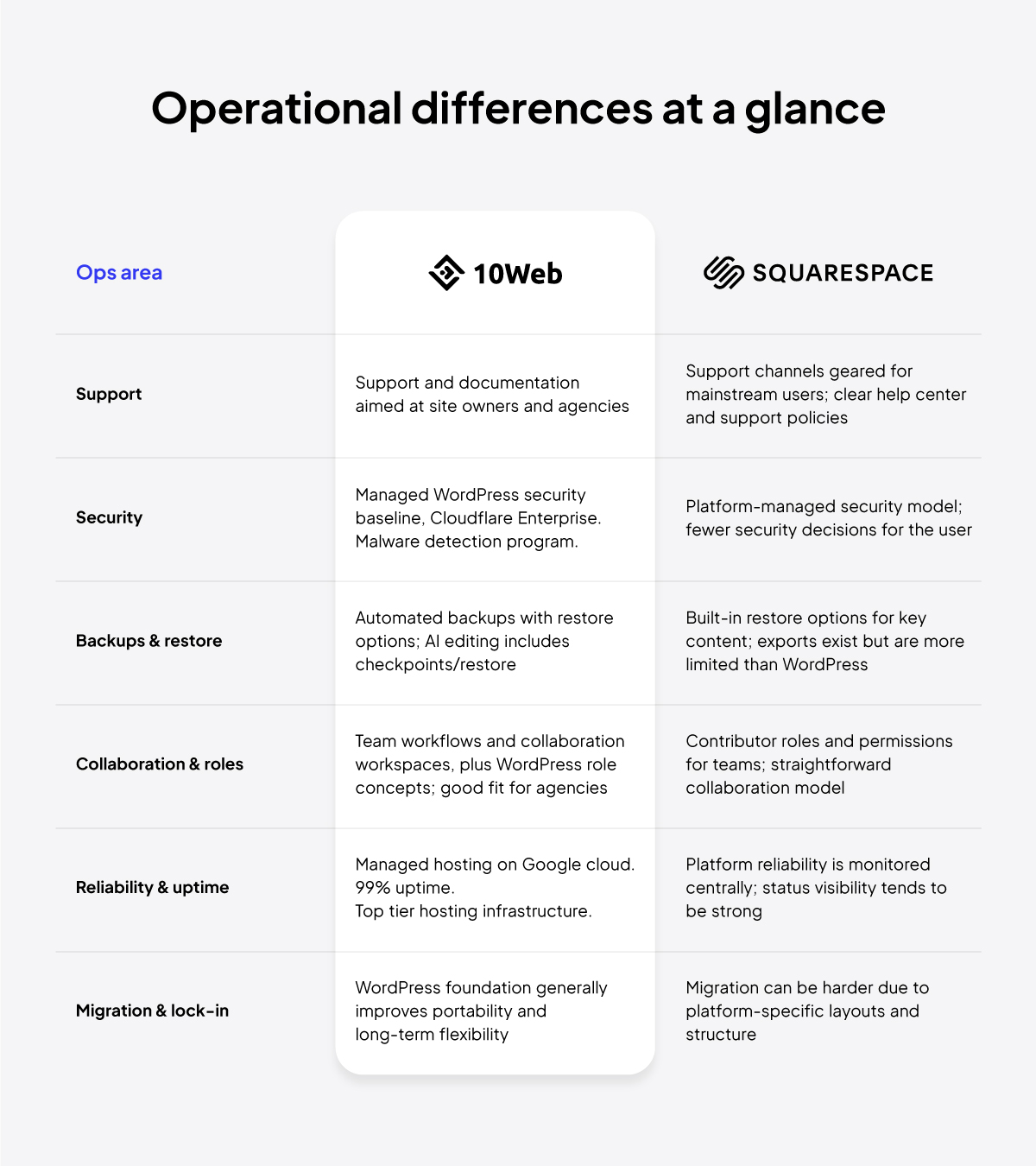
This is also where builder lock-in becomes real. Leaving any builder is work, but leaving a closed platform can be harder if your site structure is deeply tied to the platform’s layout model. WordPress generally gives you more portability over time because it’s an open ecosystem and widely supported.
If you feel uncertain here, use this mental model: Squarespace is designed to be the place you stay. WordPress-based builders are designed to be the foundation you can move and extend.
Pricing
Pricing pages are never the full story. The real cost of a builder is what you pay in money and what you pay in effort.
Squarespace sells simplicity as a package: the builder, hosting, and core site tools are bundled into plan tiers, and its Blueprint AI builder is part of the “get started fast” experience. That usually means fewer moving parts, because the platform decides a lot of the stack for you.
10Web also sells a bundled experience, but with a different pricing logic: tiered plans that cover AI building + managed WordPress hosting.
The smartest way to compare pricing is not which is cheaper, but which one reduces the costs that matter to you.
- If you hate ongoing decisions, a clean all-in-one price is worth a lot.
- If you hate rebuilding later, paying for flexibility is worth a lot.
Why 10Web is stronger
10Web is a website build pipeline. Its advantage is that it helps you go from plan → generate → refine → publish → iterate in minutes.
10Web is strongest when you need speed and you expect growth. Here’s why the builder is better:
- Structure-first building: You start by shaping the site’s structure (pages/sections/navigation) before the site is generated, which makes the build cleaner from day one.
- A real production site, not a demo: It generates a full WordPress website, so you’re building on a foundation that’s meant to expand (content, plugins, features).
- Two refinement paths after generation: You can make fast changes with AI chat (Vibe) or fine-tune visually with an Elementor-based editor—so you’re not locked into one way of building.
- Shipping is part of the workflow: Staging/preview and “go live” are treated like steps in the builder flow, alongside essentials like hosting, SSL, backups, and performance tooling.
- Safer iteration (especially with AI): The Vibe workflow includes checkpoints/diffs/restore, which makes fast editing feel less risky.
- Ecommerce that can scale: If ecommerce is central, the WooCommerce-backed path gives you a deeper ceiling than simpler “store add-ons,” and the builder flow supports generating and refining storefront pages.
- Built for repeatable builds: The platform’s direction supports agency/partner workflows and even “builder as infrastructure” concepts (templates, provisioning, governance)—which matters if you’ll build many sites.
10Web is great when you want more output per hour and room to grow.
The 15-minute builder test (this beats reading 20 reviews)
If you’re still stuck, don’t guess. Run the same mini-project in both systems and see which one works better for you.
- Build a 5-page site (Home, About, Services, Contact, Blog)
- Add one reusable CTA section on 3 pages
- Make one sitewide style change (fonts + button style)
- Add a new page later and match the existing style perfectly
- Make one mobile tweak and confirm it still looks clean
That test reveals the truth fast: whether the builder keeps you consistent, whether edits feel safe, and whether you can scale without the site turning messy.
Final thoughts
The best website builder isn’t the one with the longest feature list—it’s the one that fits the way you and your team work. Some people want a builder that stays simple, keeps decisions low, and makes updates feel routine. Others want a builder that moves faster, supports bigger builds, and leaves the door open for growth without starting over.
So don’t choose based on the perfect demo site. Choose based on your next six months: how often you’ll update, how much you’ll expand, and how much control you’ll want when your site stops being new and starts being part of your real workflow.
FAQ
Which builder is easier for beginners?
Squarespace is usually easier at the start because it’s an all-in-one system with fewer setup decisions. 10Web is also beginner friendly, but it’s easier if you’re comfortable with basic WordPress ideas.
Do both have an AI website builder?
Yes. Squarespace has an AI builder (Blueprint), and 10Web generates a WordPress site using AI. The difference is that 10Web AI uses WordPress as its backend.
Does 10Web build a real WordPress site?
Yes, 10Web generates an actual WordPress website that you can keep refining and expanding. That matters if you want to scale, integrations, and long-term flexibility.
Which is better for building lots of pages fast?
10Web is often better for quickly getting a larger multi-page first draft, then refining it.
Which is better for ecommerce?
10Web is typically better if you want WooCommerce-style depth and customization as your store grows.
Can I migrate later, or will I be locked in?
Squarespace exports are limited, so moving away can take work depending on your site structure. With 10Web, being WordPress-based generally makes portability and switching easier over time.


