

Choosing a website builder isn’t really about how fast you can publish a homepage. Almost any modern tool can do that. The real difference shows up a few weeks later, when you need to add a new service, tweak your messaging, improve SEO, or sell something online.
That’s where builders start to reveal what they’re actually designed for.
10Web and Design.com both promise speed and simplicity, but one starts with branding and keeps things intentionally lightweight, while the other starts with an AI-generated WordPress structure and assumes your site might need to grow. While both platforms help small businesses get online quickly, they’re designed for very different long-term needs.
When trying to decide between them, it’s less a question of which is better and more like how do you plan to use your website over the next six months, year, and beyond.
10Web vs Design.com at a glance
Design.com is a brand-first, template-driven builder that prioritizes simplicity and fast publishing with minimal decisions, making it ideal for quick sites and brochure-style sites.
10Web uses AI to generate a full WordPress website and is built for businesses that expect to grow, offering deeper control over content, SEO, ecommerce, and integrations.
The best choice depends on whether your website will stay simple or become a core asset over time.
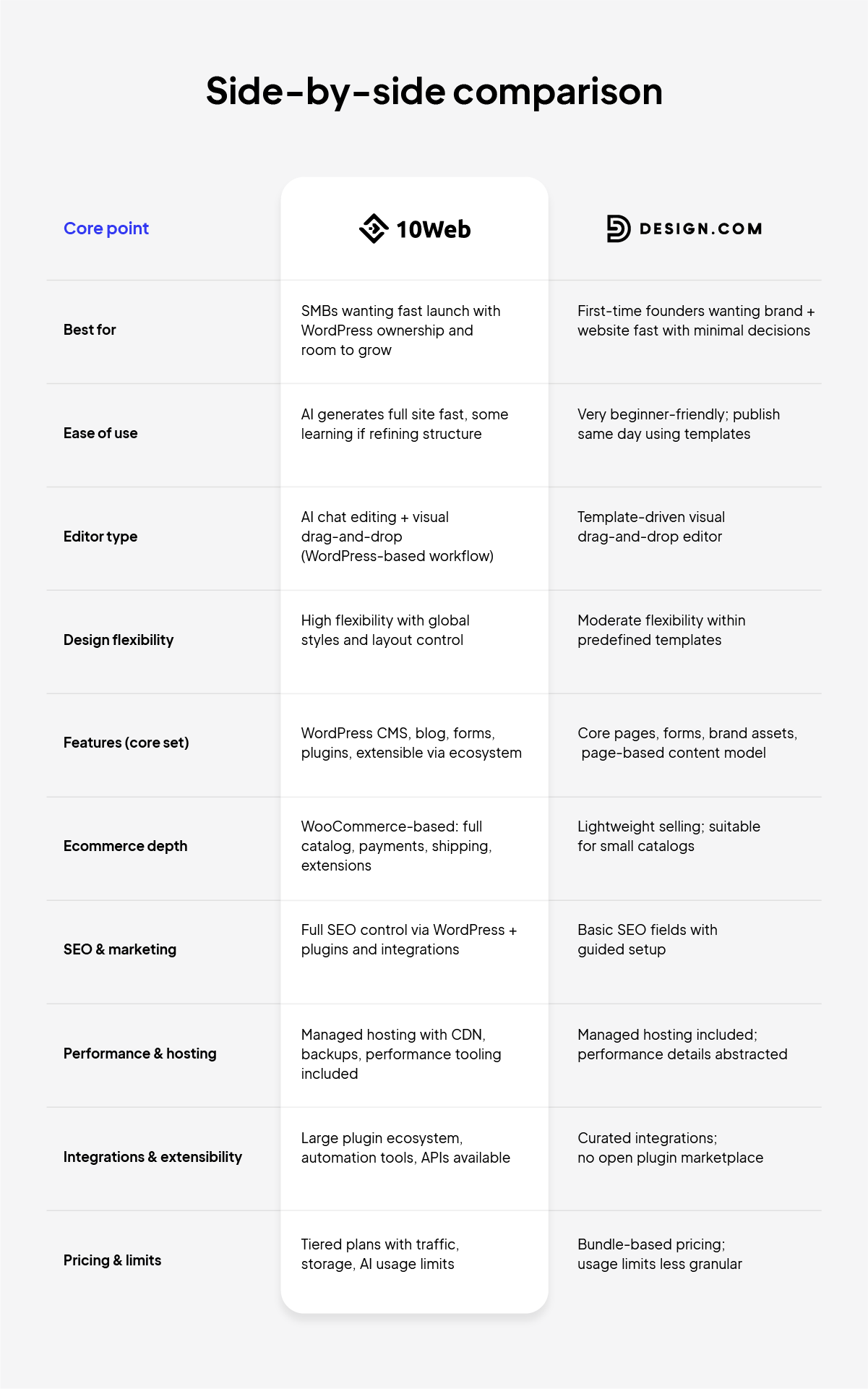
Comparing 10Web vs Design.com’s website builders.
Two different starting points: website-first vs brand-first
Design.com is best understood as a brand-first platform. Many users arrive to create a logo, pick brand colors, secure a domain, and then add a website as part of that bundle. The site builder fits neatly into that flow: choose a template, customize it visually, publish, and move on.
10Web takes the opposite approach. It treats the website as part of an ongoing system, not just a surface. You describe your business, the platform plans a full site structure, generates a full WordPress site with AI, and then gives you multiple ways to refine it, visually or through AI-driven edits.
Which website builder is faster to launch for beginners?
If your primary goal is to get online as quickly as possible with minimal thinking, Design.com feels immediately comfortable. The editor is simple, the templates are polished, and the number of decisions is intentionally small. Many first-time website creators can publish a site the same day without friction.
10Web also gets you to a live site quickly, but the difference becomes clearer when you understand the basic steps involved in building a website from scratch, from planning pages to structuring content and publishing. Instead of picking a template first, you review a proposed structure, pages, navigation, and sections, then let the AI generate the site. For some users, that feels empowering.
Editing experience and design consistency
Comparing 10Web vs Design.com’s website builders uncovers a wildly different experience creating a website on each platform.
Design.com’s editor is visual and template-driven. You replace text, swap images, adjust colors, and rearrange sections within a defined system. That structure makes it hard to accidentally break the design. Sites tend to stay consistent, even when edited by non-designers.
10Web’s AI Website Builder offers more than one way to edit. You can use a familiar drag-and-drop editor, or you can ask the AI to make changes for you, rewrite sections, regenerate layouts, or adjust styles across pages. With Vibe for WordPress, changes are treated as iterations, with checkpoints and restore options, which makes experimentation feel safer.
Design flexibility: polish today vs flexibility as your business grows
Design.com sites usually look good out of the box. The templates enforce spacing, typography, and layout rules that protect visual coherence. For many site owners, that’s exactly what they want: fewer ways to make mistakes.
10Web has a higher design ceiling. You can control global styles, reuse sections, and push layouts further. Over time, this allows the site to feel more custom and less like a template. But that same flexibility means polish depends more on how carefully the site is refined.
Content and features: simple pages vs a full CMS
Design.com covers the essentials well. Pages, contact forms, brand assets, and basic site structure are all built in. For brochure-style sites or early-stage businesses, that’s often enough.
10Web is built on WordPress, which changes the equation. Blogging, content management, advanced form builder plugins, SEO tools, and integrations are part of the ecosystem. You don’t have to use that depth on day one, but it’s there when you need it.
Ecommerce: lightweight selling vs a scalable online store
Both platforms can handle ecommerce, but they assume different futures.
Design.com’s ecommerce is suitable for light selling, accepting payments, offering a small set of products or services, and keeping everything simple. It works best when selling is secondary to the site itself.
10Web uses WooCommerce under the hood. That means product catalogs, inventory, shipping rules, payment gateways, and extensions are all available. It’s more setup, but it supports real growth.
If selling online is likely to become central to your business, this distinction becomes important faster than most founders expect.
SEO and marketing: basic setup vs long-term control
Design.com provides basic SEO controls and relies on sensible defaults. For many websites, that’s fine. The platform assumes SEO is something you set up once and revisit occasionally.
10Web is one of the best website builders for SEO because it’s built on WordPress, offering access to essential plugins for full control over your site’s SEO. You can start with AI-generated basics and grow into more advanced strategies over time. This makes it better suited for businesses and sites that expect search traffic to matter more as they grow.
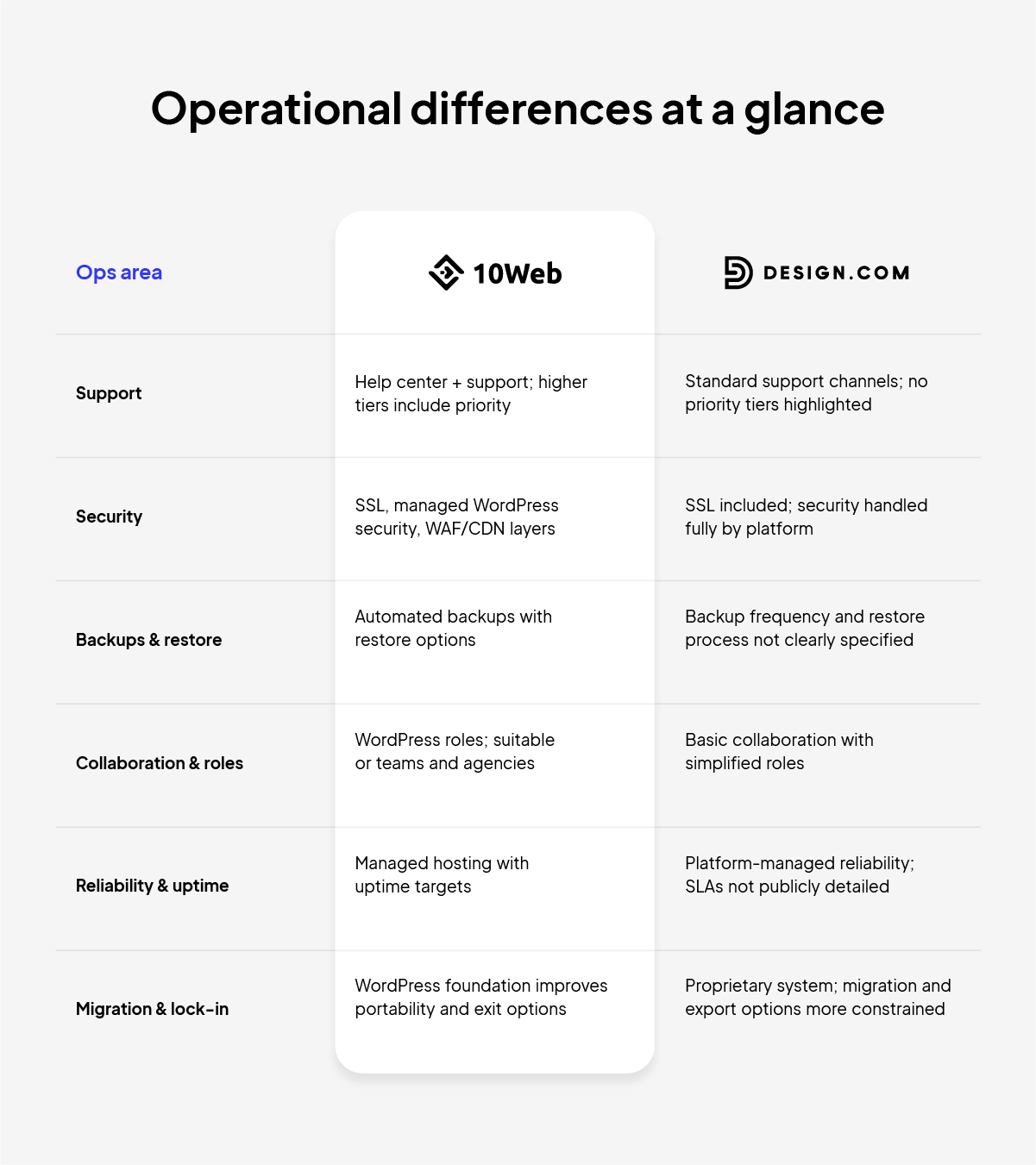
Comparing 10Web vs Design.com for ease of use and portability.
Hosting and reliability
Both platforms include hosting and SSL, which removes much of the complexity. The difference is transparency.
Design.com abstracts most operational details. Backups, performance tuning, and infrastructure are handled for you, but not deeply surfaced. That keeps things calm, but opaque.
10Web includes managed hosting, backups, performance optimization, and CDN tooling, and integrates those systems into the platform experience. You don’t manage servers, but you do see and control more of what’s happening.
This matters most when something breaks, slows down, or needs to scale.
Growth, portability, and lock-in
This is where long-term decisions quietly form. Switching costs can accumulate as businesses embed tools into daily workflows, making platform changes harder and more costly over time.
Design.com is a closed platform. It’s designed to be the place you stay. For many sites, that’s perfectly acceptable, especially if the site remains simple.
10Web builds on WordPress, which improves portability. Moving any site is work, but running a standard WordPress site reduces long-term lock-in and gives you more options if your needs change.
This openness is also why 10Web naturally supports agency workflows through white-labeling and the Website Builder API. You don’t need those features as a solo founder, but they’re there if your business grows into them.
Which website builder should you choose: 10Web or Design.com?
The best website builder is the one that fits how your website actually evolves.
If your website is mostly a digital business card, Design.com keeps things clean and easy. If your website is going to become a real asset, with marketing, content, sales, and integrations, 10Web gives you room to grow without starting over.
Choose Design.com if:
- You want a fast, brand-led setup
- Your site will stay simple
- You prefer strong guardrails and minimal decisions
- Ecommerce and SEO are secondary concerns
Choose 10Web if:
- You want speed without rebuilding later
- You expect your site to grow in pages, content, or commerce
- You care about ownership and flexibility
- You want AI to help you iterate, not just launch
The trick is choosing the website builder you won’t outgrow.
FAQ
Is 10Web harder to use than Design.com?
Can I launch a website faster with Design.com?
Which platform is better if my business grows over time?
Can I run a real online store on Design.com or 10Web?
How do SEO capabilities compare between 10Web and Design.com?
Do I need WordPress experience to use 10Web?
What happens if I want to move my site later?


