
Crowdfunding pages win or lose in a handful of screens. The strongest ones make a crisp promise above the fold, keep momentum visible with progress bars and tiers, and prove they’re real with steady updates and credible signals.
In this editorial gallery, we’ll tour 10 crowdfunding website examples, from Kickstarter and Indiegogo to nonprofit donation flows and a wholly owned campaign site, and shed some light on the persuasion patterns and design that actually move people to back.
For each example, you’ll find a ready-made AI prompt designed to bring the exact conversion highlights to life on a WordPress site using 10Web’s AI Website Builder.
What high-converting crowdfunding pages share
The first screen earns the second. That means a:
- One-line value prop
- Strong hero media
- Decisive CTA
Right beside that compelling CTA button, winning pages tuck in a micro-proof nudge, backer count, a Project We Love badge, or a press logo, because small credibility cues lower perceived risk. Platform playbooks follow the formula.
- Tell the story clearly
- Structure rewards cleanly
- Communicate with backers through updates.
Momentum is its own persuasion. The best pages keep a visible drumbeat, with updates, progress bars, and stretch goals, so fence-sitters see things moving right now. Pre-launch matters too. A compact waitlist page with a Notify me flow turns curiosity into an ongoing relationship.
Marketplace vs. your own site
Marketplaces like Kickstarter, Indiegogo, and GoFundMe bring trust and discovery, but they also come with rules, fees, and tighter templates. Alternatively, a site you own gives you brand control, analytics, and portable audience data. And thanks to tools like the AI Website Builder, you can:
- Generate your website from a short brief
- Refine it visually with AI Co-Pilot
- Launch a site on automatically fast, secure Google Cloud hosting.
It’s the practical path to control your website’s functionality and appearance, retain ownership of all your data, and still use the conversion patterns used by these crowdfunding site examples.
Pros and cons at a glance
- Marketplace: built-in credibility and network effects, but less design control, more fees, and stricter policies.
- Owned site: full branding, features, data portability, but you’re in charge of hosting, the site, and everything that comes with it. But, with WordPress, you’ve got tons of essential plugins and user-friendly options to help out with this part.
10 crowdfunding website examples that work
The best crowdfunding website examples share key design elements and copywriting strategies. Some hook you with a one-line promise, or make progress impossible to ignore. Others earn trust with updates and clear outcomes. The ten examples below span marketplaces and privately owned sites, so you can see the patterns in the wild and adapt the best strategies for your website.
For each example, you’ll get a mini-analysis on what we think makes it successful, plus a ready-made AI prompt to help you bring the best of the best to WordPress with 10Web.
Best crowdfunding examples on marketplace platforms (Kickstarter, Indiegogo, GoFundMe)
Here’s how the top marketplace pages structure heroes, progress, tiers, and updates to convert fast. Use these as design references if you want built-in trust and discovery, with the trade-offs of platform fees and templates.
1. Exploding Kittens (Kickstarter)
Personality plus clarity gives Exploding Kittens an instant hook.
For: Product creators who want a playful but unmistakable pitch.

Why it works: A one-line promise and a hero that sells the game at a glance, with a simple reward ladder; lively updates keep momentum visible.
What to borrow:
- One-sentence value prop in the hero
- 3-tier reward grid (early bird, standard, deluxe)
- Updates link pinned in the top nav
AI prompt to start: Create a playful crowdfunding landing page for a tabletop game. Hero: one-line promise + video + single CTA. Add a 3-tier grid, proof row (press/quotes), and an Updates section.
2) Pebble Time (Kickstarter)
Pebble Time’s crowdfunding progress you can’t ignore.
For: Hardware teams with stretch goals and spec-heavy stories.

Why it works: Progress near the hero, clear stretch-goal unlocks, scannable specs; momentum becomes the message.
What to borrow:
- Progress bar above the fold
- Stretch goals with benefit-focused labels
- Sticky mini-progress on scroll
AI prompt: Build a product pre-order page with a prominent progress bar near the hero, a Stretch Goals section that unlocks perks at milestones, and a compact feature story with anchors to Specs, Goals, FAQ.
3) Fidget Cube (Kickstarter)
Fidget Cube’s credibility is crucial for the CTA
For: Consumer gadgets aimed at everyday habit relief.

Why it works: Testimonials and creator credibility sit alongside the button, while a compact FAQ anticipates common questions.
What to borrow:
- Testimonial carousel within thumb-reach of CTA
- 5-question FAQ (shipping, timeline, returns, warranty, contact)
- Creator bio card with photo + 1-line mission
AI prompt: Generate a compact landing page with a creator bio card, testimonial carousel near the CTA, and a 5-question FAQ covering shipping, timeline, and returns.
4) Flow Hive (Indiegogo/InDemand)
A story-led promise and post-goal harvest from Flow Hive.
For: Tangible products with ongoing availability.

Why it works: Visual promise (“honey on tap”), demo video in hero, InDemand lifecycle keeps selling after funding.
What to borrow:
- Short demo video block in hero
- “Still available” banner post-goal
- Progress bar that remains after funding
AI prompt: Create a product story page with a short demo video in the hero, a benefits grid, a visible ‘Still available’ banner after the goal, and a Progress bar that stays on the page post-funding.
6) GoFundMe pattern
The tried-and-true GoFundMe fundraising formula is a framework for successful, story-first crowdfunding templates across personal and community causes. This usually consists of a clear “what happened, what we need, how funds help” narrative, a simple donate form, and short, date-stamped updates that build trust over time. It’s not a specific site, but it’s the standard layout you’ll see on many GoFundMe pages, distilled so you can replicate the structure on your own domain.
For: Individuals and community causes.
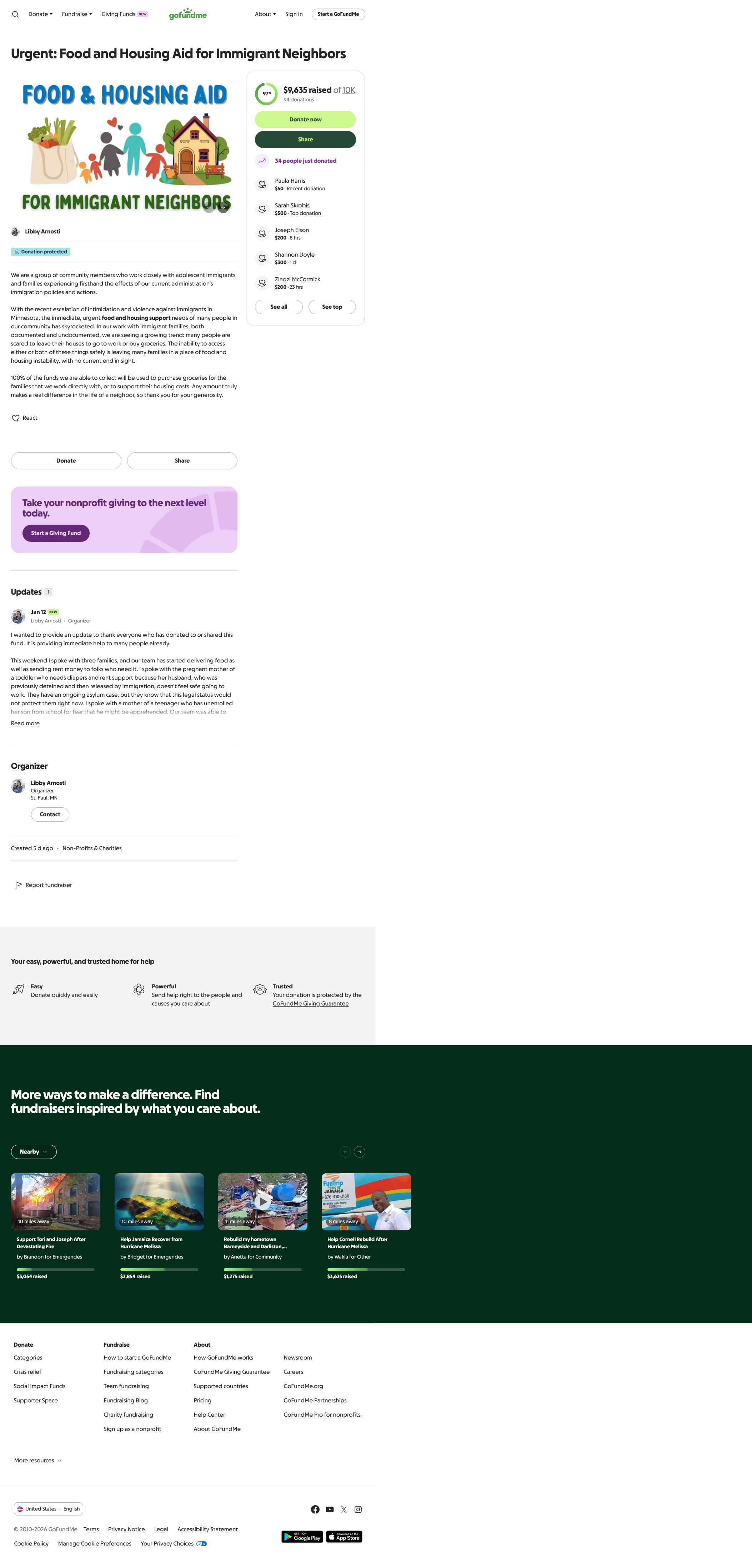
Why it works: A clear narrative that describes what happened, what’s needed, and how funds help, plus timely updates, builds trust.
What to borrow:
- Story-first hero image leading 2–3 paragraphs
- Need & impact breakdown with specific numbers
- Updates feed with short, date-stamped posts
AI prompt: Create a story-first donation page with sections: What happened, Why we need help, How funds will be used, and an Updates feed. Add a single photo in the hero and a simple donate form.
Best independently owned crowdfunding website examples (WordPress & custom builds)
These sites live on their own domains and prioritize brand control, flexible layouts, and data ownership. Borrow the same conversion patterns, like progress bars, benefit-labeled tiers, and update feeds, without marketplace constraints.
5) #TeamTrees (custom build)
TeamTrees shows off projects and donation-dollar impact.
For: Nonprofits and cause sites needing simple, motivating framing.

Why it works: The impact of donation dollars is clear, while live progress drives sharing. The donation flow is minimal.
What to borrow:
- Live progress component at the top
- Suggested amounts with impact labels (e.g., $25 = X trees)
- Short “How funds are used” explainer under form
AI prompt: Build a donation page where the hero shows a live progress bar and suggested amounts with impact labels (e.g., $X = Y trees). Include a short ‘How funds are used’ block under the form.
7) charity: water (custom build)
Charity:water gets the recurring donations flowing.
For: Nonprofits growing monthly support.
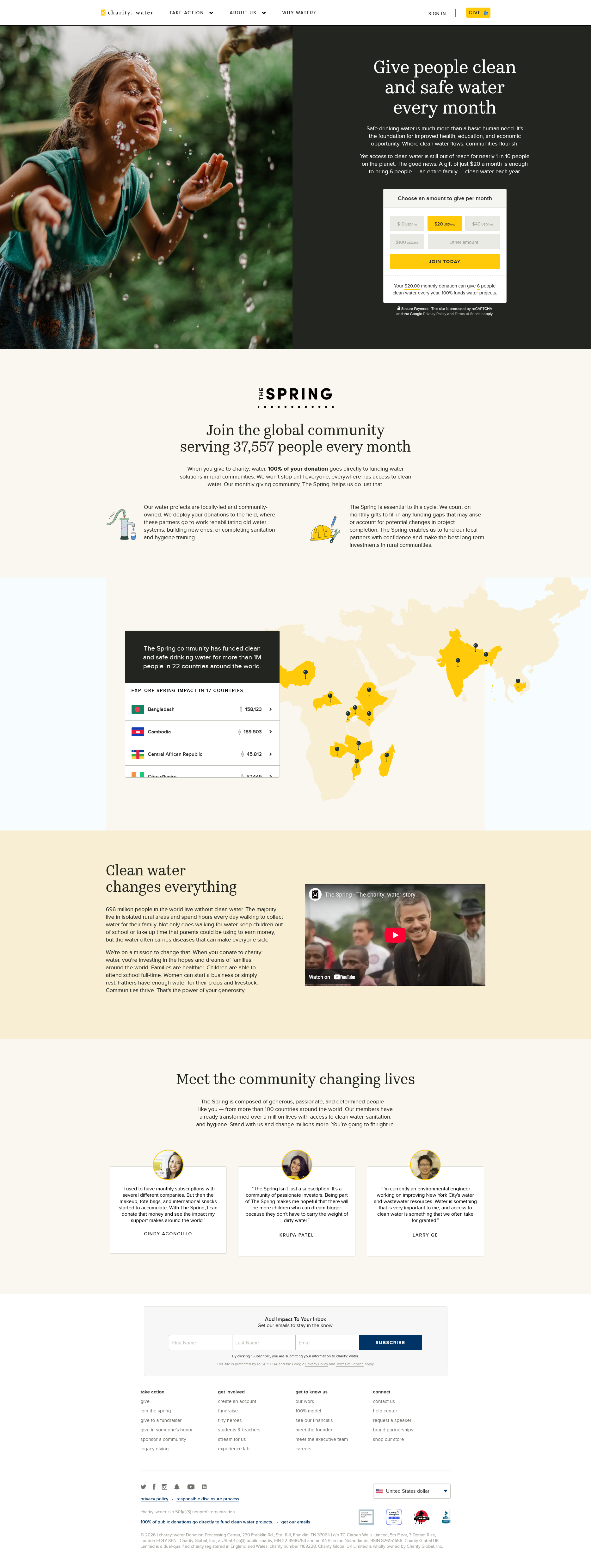
Why it works: Monthly default, outcome-labeled presets, and transparent allocation copy reduce friction and lift LTV.
What to borrow:
- Monthly toggle pre-selected (one-time still available)
- Impact labels on each amount
- “Where your money goes” summary below form
AI prompt: Design a donation page with a Monthly toggle pre-selected, suggested amounts, impact notes, and a transparent ‘Where your money goes’ summary below the form.
8) World Central Kitchen (WordPress)
Low-friction donations fire up the World Central Kitchen.
For: Rapid-response fundraising.
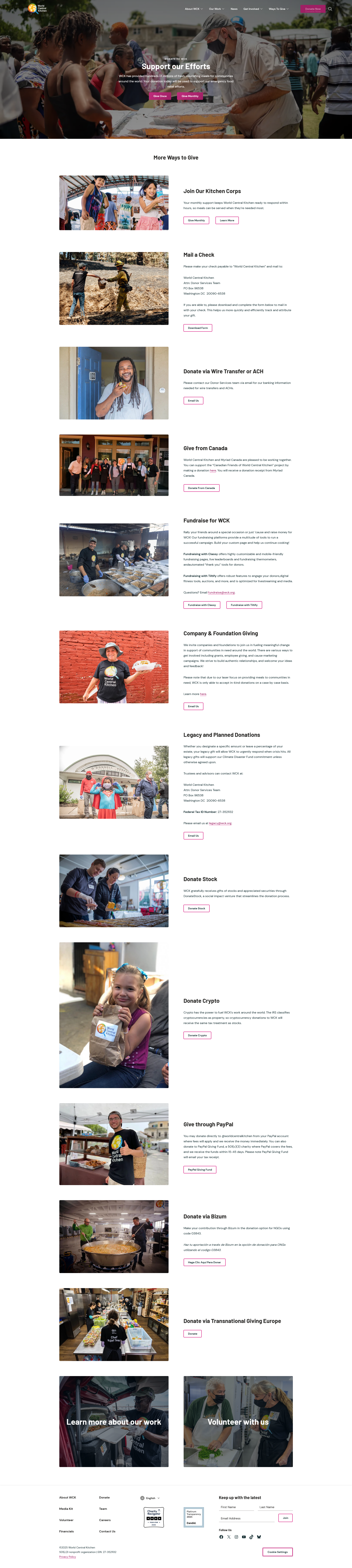
Why it works: Fewer fields and a clear monthly option, plus plain-language route explanations, reduce anxiety and speed the gift.
What to borrow:
- Minimal fields checkout
- Side-by-side “donation route” explainer (fastest vs. fee-covered)
- Short ‘your gift in 24h’ impact note
AI prompt: Generate a streamlined crisis-response donation page with minimal fields, a clear ‘Give monthly’ option, and a short explainer comparing donation routes (fastest vs fee-covered).
9) Kiva (custom build)
Kiva lowers the bar to entry.
For: Micro-giving and loan platforms.
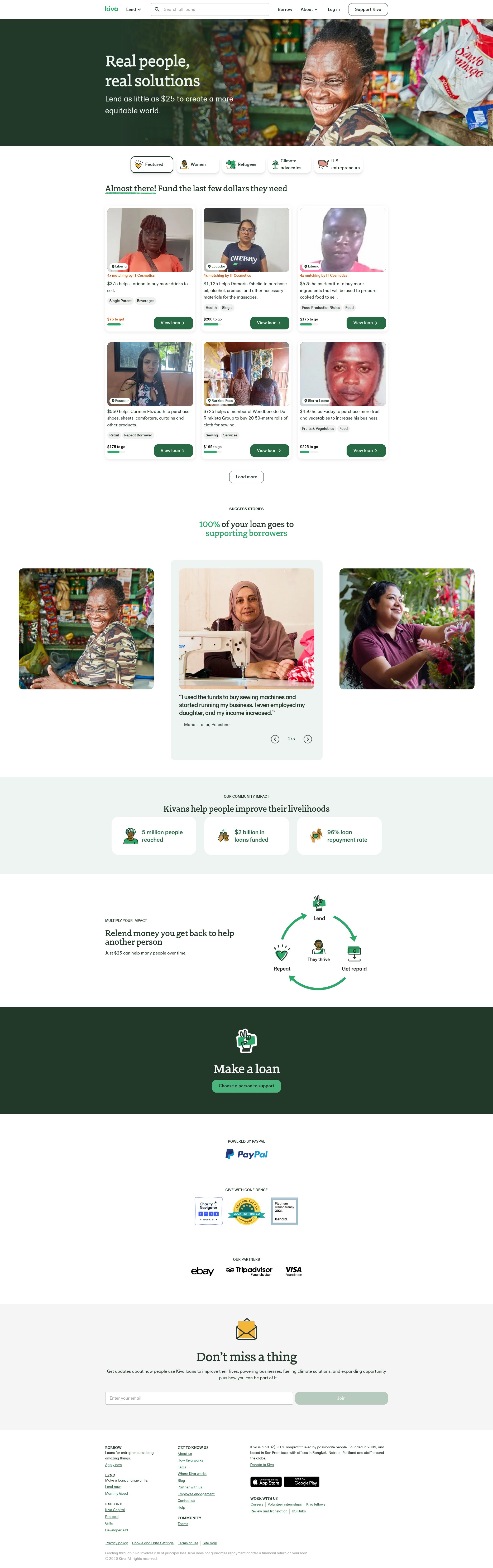
Why it works: $25 entry, transparent project cards, visible time left; optional platform tip builds trust.
What to borrow:
- Grid of project cards (purpose, progress, time left)
- Small, specific ask in the card
- Optional platform support note at checkout
AI prompt: Create a project grid where each card shows the project’s purpose, time left, and progress. Keep the primary task small and show a note about optional platform support.
10) Pre-launch pattern (owned sites, including WordPress)
For custom-built and WordPress crowdfunding websites, the proven formula for a well-hyped pre-launch strategy often includes a one-screen waitlist/notify-me page designed to warm an audience before launch. These pages usually have a single CTA, some light social proof, and a countdown or early-bird perk. It’s a conversion starter, meant to collect emails and prime day-one momentum, even before you publish the full campaign page.
For: Any campaign that needs a product launch-day surge.
Why it works: A simple waitlist page turns curiosity into momentum; an early-bird perk sets intent.
What to borrow:
- One-screen page with “Notify me” CTA
- Proof row (logos/quotes) and countdown
- Early-bird perk value stated in the hero
AI prompt: Build a one-screen pre-launch page with a single ‘Notify me’ CTA, social proof row, and a countdown. Promise an early-bird perk and preview the first stretch goal.
The anatomy of a converting page
Every successful example above follows a similar framework: a crisp promise, believable proof, visible progress, and steady updates. Whether you’re studying Kickstarter page design or donation website patterns, the labels change, but the conversion process remains the same. Keep the first screen focused, keep progress near the primary CTA, and keep the update rhythm visible on mobile.
First-screen checklist
- One-line value prop, strong media, single CTA
- Micro-proof near the button (backers, badges, trusted by)
- Mobile-first spacing so buttons are thumb-reachable and headlines scan fast
Distribution & community: how great pages get seen
A solid page needs oxygen. The campaigns above didn’t grow in a vacuum. Instead, they primed a community before launch and fed it during the run.
- A pre-launch list turns day-one interest into visible momentum.
- A lightweight press kit (logo, one-paragraph story, three screenshots) makes it easy for bloggers and local media to cover you.
- On Reddit or Discord, transparency beats hype, hands down. Definitely share progress, ask for specific feedback, and follow up with visible changes.
Better yet. Treat updates like miniature press releases, short, frequent, and anchored to milestones and fundraising events, naturally giving backers something to talk about.
Build it yourself: from inspiration to live site
With 10Web’s AI Website Builder, you can create donation-ready sites that leverage all the persuasive elements found in the examples above.
- Pick your model: Choose the closest match from the examples (hardware preorder, indie game with stretch goals, nonprofit monthly giving, or personal-cause story).
- Paste a focused brief into 10Web: Example: “Product: solar lantern. Audience: campers. Goal: pre-orders. Tone: trustworthy. Include hero with one-line promise + video, visible progress, 3 reward tiers, proof row, and Updates.”For donations: “…Donation page with live progress, presets with impact notes, monthly toggle pre-selected, and ‘How funds are used’ block.”
- Generate and scan the first screen: Confirm the hero says one thing clearly, the CTA is singular, and micro-proof (backers/press/trust) sits near the button.
- Add the conversion modules: Drop in: Progress (keep it near the CTA), Tiers/Donation presets (label with benefits/impact), a Proof row (logos/testimonials), an Updates feed, and a short FAQ.
- Wire “real” goals & payments (lightweight).
- If you’re donation-first: install a fundraising plugin (e.g., GiveWP or Charitable) for goal/thermometer widgets, recurring giving, and receipts; place the plugin’s goal widget/shortcode on the page so totals auto-update.
- If you’re tiers/preorders: use WooCommerce and a preorder/pledge extension to mimic marketplace tiers (Early Bird / Standard / Deluxe), with clear “what you get.”
- Mobile pass: Shorten the hero headline, keep CTAs thumb-reachable, and make sure progress and tiers are readable without pinching/zooming.
- Launch on your domain: Connect the domain, enable analytics/pixels, and publish. (10Web handles WordPress, performance, SSL, and hosting.)
- Iterate weekly: A/B the hero line, rename tiers/presets, and post one short update every week (milestones, press, thank-yous).
WordPress essentials for crowdfunding sites
WordPress sites get a leg up on essential elements for crowdfunding sites, with tons of plugins and extensions, plus support for ecommerce.
Real-time progress: Use a fundraising plugin like GiveWP for a goal/progress widget with real-time updates. For a simple visual only, Elementor’s Progress Bar works.
Tiers, preorders, and storefront: WooCommerce + a preorder/pledge extension for reward tiers, inventory caps, and checkout. Keep tier names benefit-first (Early Bird — Save 20%).
Recurring monthly giving: Enable recurring donations in your plugin like Charitable (or WooCommerce subscriptions). Show a Monthly toggle next to presets and add one-line impact notes (e.g., $25/month = classroom supplies for 5 students).
Trust & updates: Add a compact proof strip (press/partners/testimonials) near the CTA and a visible Updates section (short, dated posts). These double as persuasion and shareable content.
Finding inspiration with the best crowdfunding site examples
The common thread across the best crowdfunding website designs, from Kickstarter to GoFundMe to nonprofit crowdfunding examples, is clarity, credibility, and momentum. Use the ten examples and prompts above to find the design you need, and ship a page that makes waves. With 10Web, you get the speed of AI and the power of WordPress, so you can keep marketplace-style features and full brand control on your own domain.
FAQ
Should I use Kickstarter/Indiegogo/GoFundMe or build my own site?
Can I actually match platform-style features on WordPress?
What does 10Web's AI builder do vs. what I still configure?
How do I add a real-time goal/progress bar like the examples?
Can I do recurring monthly donations?
Will my site be fast enough on mobile?
Do I keep ownership of my content, data, and SEO?